Update (2026-05-12): The
claude-config-templaterepo referenced below has been retired. It is replaced by codebench.
I’ve been working on extending my claude-config-template with a simple UI. The idea was to make it easier to manage Claude workflows - visual task boards, quick command access, that sort of thing. I looked at existing solutions like Auto-Claude and Vibe Kanban, and while they’re interesting projects, neither quite fit what I needed.
Auto-Claude focuses on autonomous multi-agent orchestration - running a lot of agents in parallel with isolated workspaces. Interesting, but in my experience handling more than 1 complicated and 1 simple process at the same time is taxing my capabilities. Also it is quite new, so there was some trouble getting it to work (I failed). I looked at the code and the errors and there is a lot of AI generated stuff in there, including the common slop that seems to hinder a lot of current projects. So then Vibe Kanban came on my radar: it is a kanban board for managing AI coding agents. Also great, but I wanted something that integrated tightly with my existing slash commands and documentation structure without adopting a new paradigm.
So I started building my own. A few hours later, I had a FastAPI backend and a simple frontend working. Then I got on a sidequest: choosing ports for the backend and frontend servers that wouldn’t conflict with anything else on my machine. This is surprisingly tricky, so I decided to document my findings.
The Port Problem
My backend defaulted to 8000. Fastapi uses uvicorn which defaults to port 8000. So far no problem. But the idea is to import and install this project in other environments as well, so I wanted to avoid common ports. Quite annoying if you install this and first you’ll have to sort a port conflict. Same goes for 5173 (Vite) or 3000 (React, Next.js). And there are many more common ports that developers use for various frameworks and databases. So what is a safe choice? Lets dive in.
The Three Port Ranges
Ports aren’t just random numbers. They’re organized by IANA (Internet Assigned Numbers Authority):
| Range | Name | Use |
|---|---|---|
| 0-1023 | Well-Known | System services (HTTP, SSH). Require root. |
| 1024-49151 | Registered | Can be registered with IANA. Safe for dev. |
| 49152-65535 | Dynamic/Ephemeral | Temporary connections. Avoid for servers. |
Conclusion 1: stick to the 1024-49151 range for development servers. Seems plenty of room there.
Ports You Should Avoid
Then the ports that are commonly used by a lot of stuff: these were out of the question, since they will conflict with something on your machine:
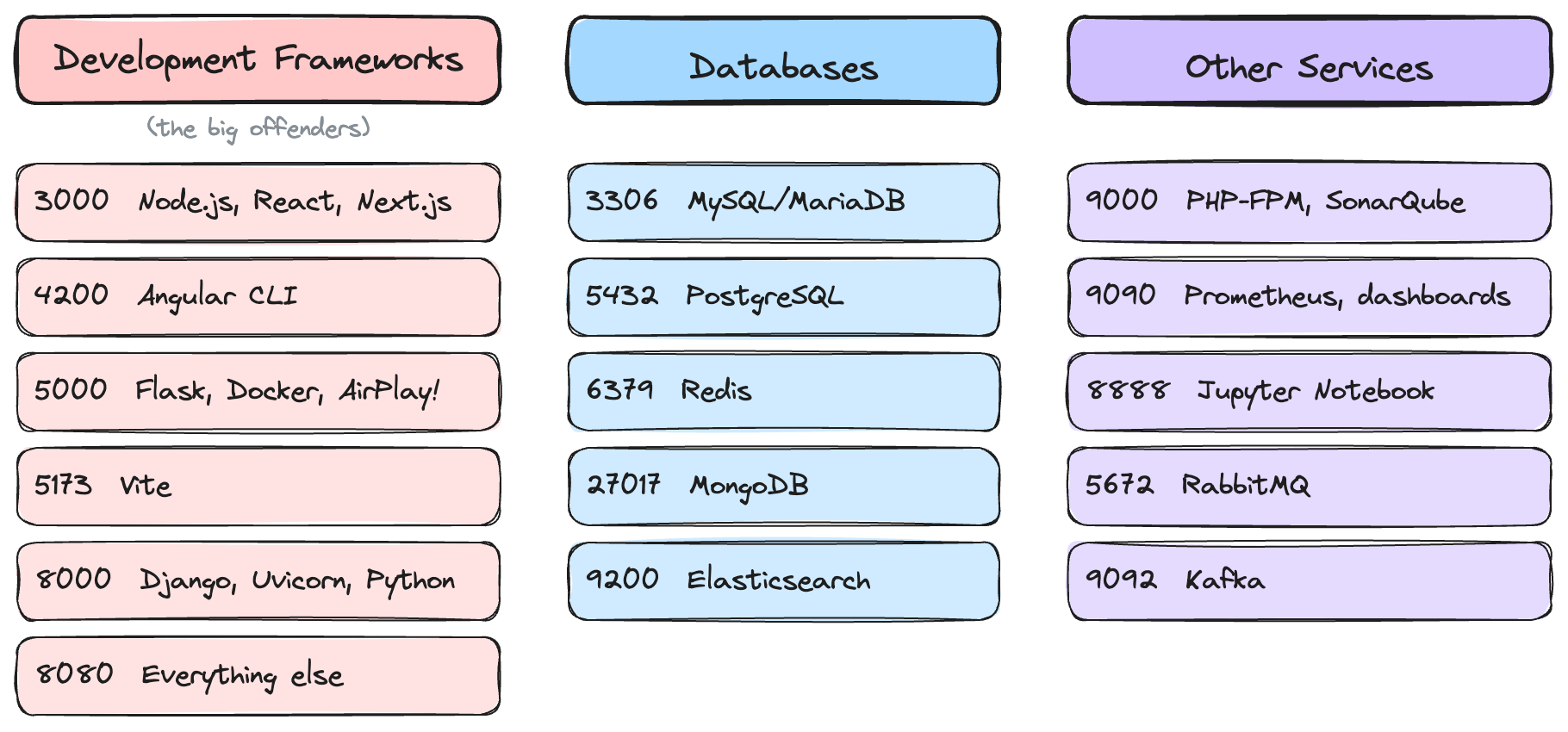
The macOS AirPlay thing on port 5000 was new to me (never use airplay or Flask) but i found quite some stuff about it. Apparently you’ll see “address already in use” and spend 20 minutes debugging your Flask app before realizing it’s your laptop’s screen sharing feature. It was some time ago I used Flask, but do not remember this conflict back then. Anyway, avoid 5000 on macOS.
So What Should You Use?
After going through IANA registrations and Wikipedia’s comprehensive list (especially the Wikipedia page is a treasure trove, I ran into protocols and games I only heard once of a long time ago), I learned something important: there’s no such thing as a truly “free” port. Every port in the registered range has something using it somewhere.
Take the memorable patterns I initially gravitated toward:
- 5678 is the default for n8n, the workflow automation tool
- 8765 is used by GUN relay peers—decentralized storage that the Internet Archive uses for censorship-resistant mirroring
But here’s the thing: how many developers run n8n or GUN relay peers locally during active development? Probably fewer than those running React, Vite, or a database. The goal isn’t finding a port that’s never been used by anything—it’s finding one that’s unlikely to conflict with tools in your daily workflow.
An even safer option (slightly lower chance of conflict):
Backend:  9118
Frontend: 8119
Technically these aren’t completely free either: 9118 is the Prometheus Jenkins exporter, and 8119 is used by macos-fortress-proxy for CSS blocking. But these are monitoring tools, not something you’d typically run on a development machine. Less memorable than the sequential patterns, but about as safe as you’ll find.
Truly unused (if you want zero documented uses):
Backend:  9143
Frontend: 6234
To find these, I searched IANA’s registry for unassigned port ranges, then verified each candidate against SpeedGuide’s port database and Google to check for unofficial uses. Port 9143 is in the unassigned 9132-9159 range, and 6234 is in the unassigned 6223-6240 range. Neither has any registered service—official or unofficial—that I could find. Not memorable at all, but if you want guaranteed zero conflicts, here you go.
I’m sticking with 9118/8119—the memorable patterns are worth the tiny risk (and I do run n8n locally sometimes). But now please do not pick these ports for your projects, otherwise we’ll have conflicts again!
What I’m Building
Back to the actual project: a simple UI layer for my claude-config-template. The idea is straightforward - a local web interface that makes it easier to manage Claude workflows without memorizing slash commands or digging through documentation.
The backend (FastAPI on port 8765) handles the orchestration logic I already built for the template. The frontend (Vite on port 5678) provides a visual interface for:
- Launching slash commands with a click instead of typing
- Viewing task progress and agent output in real-time
- Managing the thoughts directory and documentation structure
- Quick access to plans, research, and project context
Nothing fancy. No multi-agent swarms or parallel execution complexity. Just a thin UI layer that makes my existing workflow more accessible. Sometimes simple tools that fit your workflow beat sophisticated ones that don’t.
I’ll write more about the implementation once it’s stable enough to share. The repo is archived for now while I clean things up, but I’ll unarchive it soon with a proper release post. For now, at least the ports won’t conflict with anything.
Resources
- IANA Service Name and Transport Protocol Port Number Registry - The official list
- List of TCP and UDP port numbers - Wikipedia - More readable reference
- SpeedGuide Port Database - Search by port number
What ports do you use for development? Found other conflicts I didn’t mention? I’d love to hear about it—get in touch.